
What is the queue? How do software and hardware queues work? Congestion management using Queuing.


Routers use a queue to store traffic until it can be processed or serialized. switches and router interfaces have ingress (inbound) queues and egress (outbound) queues. An ingress (inbound) queue stores packets until the switch or router CPU can forward the data to the appropriate interface.
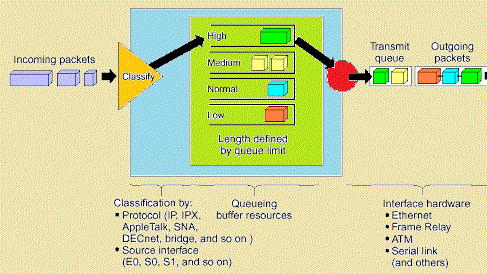


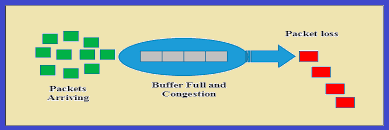
Cisco routers can be configured to perform well queuing for packets that are waiting to exit an interface. Queues are buffers in devices that hold data to be processed. Queues provide bandwidth reservation and prioritization of traffic as it enters or leaves a network device. If the queues are not emptied, they overflow and drop traffic.

We have two types of queues and fancy queueing QoS tools like CBWFQ  & LLQ.

Hardware queue 

Software queue 

Hardware queues provide the following features:

  • When an interface finishes sending a packet, the next packet from the hardware queue can be encoded and sent out the interface, without ensuring a software interrupt to the CPU—ensuring full use of interface bandwidth.
  • Always use FIFO logic first in first out.
  • Cannot be affected by IOS queuing tools.
  • IOS automatically shrinks the length of the hardware queue to a smaller length than the default when a queuing tool is present.
  • Short hardware queue length means packets are more likely to be in the controllable software queues, giving the software queuing more control of the traffic leaving the interface.
  • The only function of a hardware queue that can be manipulated is the length of the queue.

Congestion management using Queuing

Congestion can occur at any point in the network where there are points of speed mismatches or aggregation, Speed mismatches are the most typical cause of congestion. when the packets travel from LAN to WAN. Generally, a full hardware queue indicates interface congestion and software queuing is used to manage it. The software queuing system can be selected and configured depending on the platform and Cisco IOS version. Queuing manages congestion to provide bandwidth and delay guarantees.


Creation of queues. Assignment of packets to those queues based on the classification of the packets, and scheduling of the packets in a queue for transmission. Allow us to control congestion by determining the order in which packets are sent out an interface based on priorities assigned to those packets. 

Comments

Popular posts from this blog

What is of NBAR (network- based application recognition),classification QOS How to configure NBAR?

 When we implement Quality of Service (QoS ) the first step is classification, by default our router does not care about what kind of IP packets it is. Our router just looks at the routing table to find the correct destination IP address and forwards. When we configure QoS technologies like queuing, policing, or shaping before doing first we have to identify what kind of traffic is running on our routers so we can figure out what kind of application it belongs to. This is classification. What is Quality of Service (QOS)? What is Modular Quality of service CLI (MQC)? What is Classification and marking? What are IP Precedence and DSCP Values? What is AF and EF?     Once we identify our traffic (classify). Now we can mark and apply QoS policy to it. There are a few methods on IOS routers for classification: Header inspection It is a simple classification method and it works really good but has some disadvantages. Let’s say we configure our router all th...

OSPF Tunnels Vs Virtual-links

OSPF VIRTUAL LINKS  An Open Shortest Path First (OSPF) autonomous system has all areas physically connected to the backbone area (Area 0). In some cases, if this is not possible, we can use a virtual link to connect to the backbone (Area 0) through a non-backbone area. We can also use the virtual links to connect two parts of a partitioned backbone (Area 0) through a non-backbone area. The area through which we configure the virtual link, known as a transit area, must have full routing information. Remember, the transit area cannot be a stub area. Virtual link must be configuring both sides with the same area ID and the corresponding virtual link OSPF neighbor router ID. Show IP OSPF neighbors command give you the router ID information. OSPF Transit Area from Tunnel When configuring OSPF with tunnel interfaces as transit areas, there are several important considerations to ensure proper routing functionality. Here's what you need to know: Key Concepts Transit Area : In OS...

The Internal Components of a Cisco Router and Switch

The Internal Components of a Cisco Router and Switch Bootstrap Bootstrap is stored in the microcode of the ROM, the bootstrap is bringing a router up during initialization. It will boot the router and then load the IOS. POST POST (power-on-self-test) is stored in the microcode of the ROM, the POST is used to check the basic functionality of the router hardware and determine which interfaces are present. ROM monitor ROM monitor stored in the microcode of the ROM monitor is used for manufacturing, testing, and troubleshooting. Mini-IOS Mini-IOS called the RXBOOT or boot loader by Cisco, the mini-IOS is a small IOS in ROM that can be used to bring up an interface and load a Cisco IOS into flash memory. The mini-IOS can also perform a few other maintenance operations. RAM RAM (randomly used to hold packet buffers, ARP cache, routing table, and also access memory) is the software and data structure that allows the router to function. Running configuration is stored in RAM...